Your inbox, one click away.
Create an address, copy a verification code, or read a message without leaving the page you’re on. The extension connects to the same mailboxes as your account.
Manage your API keysGet the extension
For desktop Chrome, Edge, Brave, and other Chromium browsers.
Download the Chrome extensionVersion 1.2.1 · ZIP package · Manual installationChrome Web Store publication is not yet available. Install the package using the steps below.
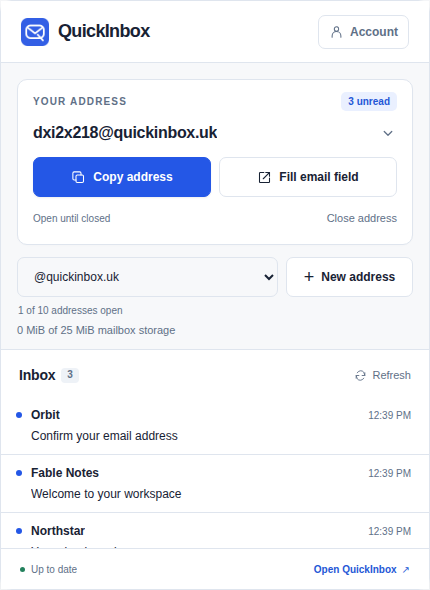
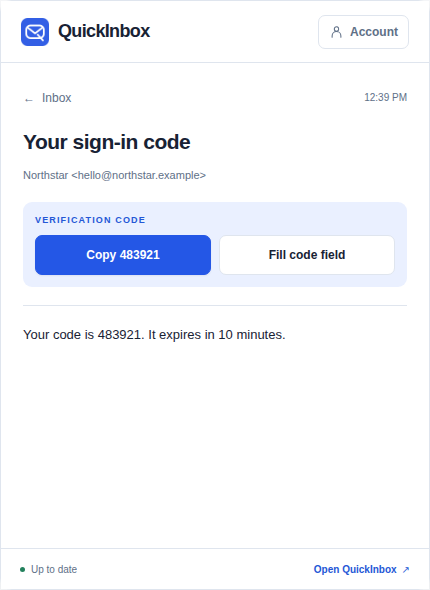
Install the local package
- Download the ZIP and extract it to a folder you can keep.
- Open
chrome://extensions(or your browser’s Extensions page) and enable Developer mode. - Choose Load unpacked and select the extracted folder.
- Pin QuickInbox to your toolbar.
Connect your account
Sign in to QuickInbox and open API → API keys. Create a key named “Browser extension”, then paste it into the extension. The key stays in this browser’s local extension storage.
Keep or close addresses
Account addresses stay open until you close them. You can have 10 open at once, with no daily creation quota. Closing an address deletes its messages and frees a slot. Its history entry can be reopened with an empty inbox.
Use it on a sign-up form
Choose an address in the popup. Copy it, or click Fill email field on a page with an email field. When a verification email arrives, open the message and copy its code or choose Fill code field. The extension never submits the form.
What the extension accesses
It connects only to QuickInbox’s API. Page access is temporary and starts when you choose a Fill action; it does not continuously scan your browsing. The toolbar badge checks your open addresses once a minute while your browser is running. Recent inbox lists are kept ready so you can switch addresses without waiting for another download. Mail itself is received and stored on the server, independently of your browser.
Read the privacy details. Need help? Email support@quickinbox.uk.